
Text Messaging System for Emergency Evacuation Accountability
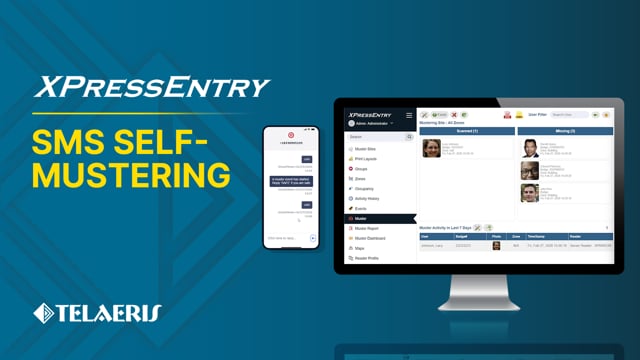
See how XPressEntry integrates with Twilio to allow users to send and receive texts for emergency evacuation accountability :
- Mass-notify employees during an emergency evacuation
- Use text messages to share safety status and automatically mark users as safe in the XPressEntry Mustering system
- Receive administrative notifications related to battery life and status of handheld devices in the field
In the XPressEntry Fast Features video series, our engineering team showcases the latest updates and improvements built into XPressEntry. These videos provide a hands-on look into features used for:
Click below to see the video or click here.
Video Transcript
0:11 Linzy: Hey, Nathaniel. I hear XPressEntry has a new SMS self-mustering feature. Do you mind telling me about it?
0:17 Nathaniel: Hey, Linzy. Sure. Twilio is a cloud communications platform that lets applications send and receive text messages. We’ve integrated XPressEntry with Twilio to allow SMS messaging directly tied to things like emergency mustering and alarm notifications.
0:33 Linzy: Cool. So, this includes back-and-forth messaging, right? Not just notifications.
0:38 Nathaniel: Exactly. That’s what makes it really useful for emergency mustering scenarios.
0:43 Linzy: Okay, let’s start there. Can you show how this works during a muster event?
0:48 Nathaniel: Sure. When an emergency muster event begins in XPressEntry, the system can automatically send a text message to affected personnel. For example, the message might say, “A muster event has started. Reply safe if you are safe.”
0:56 Linzy: And what happens when they reply?
1:03 Nathaniel: Each user’s phone number is connected to their profile inside XPressEntry. So when someone replies safe, the system automatically recognizes who sent the message and marks them as mustered, or safe, in the system.
1:12 Linzy: So, they don’t need to physically badge at a handheld device.
1:19 Nathaniel: Correct. It’s a self-muster option. It’s great for larger facilities with people who can’t immediately get to a handheld reader, or a facility where not every person has a badge, or for those who forget their badge — since most people have their phones on them all the time. Absolutely. So, we will now take a look at the mustering view from the XPressEntry web console to see the lists of safe and missing persons.
1:35 Nathaniel: One employee in the missing list is Lacy Johnson. For the sake of the demonstration, this virtual phone on the right will serve as her cellular device. She will reply safe to the emergency alert.
1:56 Nathaniel: So, we will go here and type safe and send.
2:03 Nathaniel: After a few seconds, we should see her get moved to the safe list. How quickly this occurs will depend on the configured SMS download frequency.
2:15 Nathaniel: And so, as we can see, she’s marked as safe in the evacuation event.
2:20 Linzy: That’s great. What are the prerequisite steps to get this functioning in XPressEntry?
2:25 Nathaniel: First of all, card holders and their phone numbers need to be synchronized. There are also some simple settings that need to be configured within the XPressEntry server application. Here we are in the XPressEntry server settings. Under the muster settings node in the general section, we can select “Enable muster alert messages” to enable the ability to send a message to missing persons at the start of an emergency.
2:47 Nathaniel: The SOS and safe responses can be changed here. By default, they’re going to be “help” for the SOS and “safe” for the muster.
3:00 Nathaniel: Additionally, you can configure a muster site and muster point that will be used specifically by the Twilio musters. The configured muster point will be where users are moved to after texting their safe response.
3:12 Linzy: Okay, so that’s the emergency mustering use case. You also mentioned alarm notifications. Can you explain that piece?
3:20 Nathaniel: Yes, this is another big benefit. We can use Twilio to send text messages about the status of XPressEntry handheld readers to an admin or security manager, along with other critical notifications.
3:31 Linzy: What kind of notifications?
3:34 Nathaniel: Some examples include: if a handheld goes offline for a certain amount of time, if there’s a data manager synchronization error, low and critical handheld battery notifications, and handheld panic alarms.
3:47 Linzy: Nice. So the Twilio integration allows for better visibility over not just your people, but also your XPressEntry devices.
3:55 Nathaniel: Correct.
3:56 Linzy: So what does it take to set this up? Is it complicated?
3:56 Nathaniel: It’s actually pretty straightforward.
4:01 Nathaniel: There are just a few requirements. A Twilio account, Twilio API credentials, a phone number provisioned through Twilio, and user phone numbers stored in XPressEntry. Typically, these are synchronized from your access control system, or they can be imported. Once those are configured, XPressEntry connects securely to Twilio’s API and handles the messaging automatically. And that’s it.
4:24 Linzy: Awesome. Thanks for walking us through this, Nathaniel.
4:24 Nathaniel: You’re welcome.
