
Can you see a visualization of your evacuation in real-time?
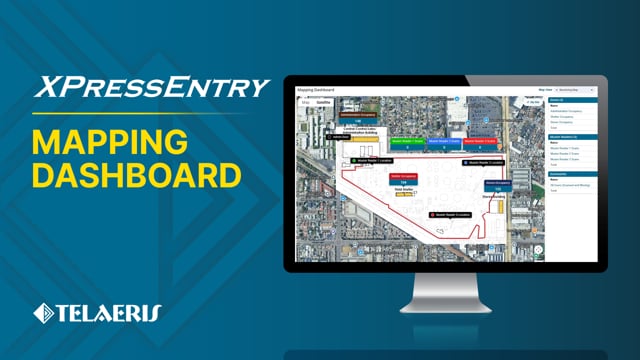
This episode of XPressEntry Fast Features covers XPressEntry’s Mapping Dashboard. With this feature, users can visualize XPID handhelds’ movement, changes in zone occupancy, and emergency evacuation accountability on a real-time map of their facility.
In the XPressEntry Fast Features video series, our engineering team showcases the latest updates and improvements built into XPressEntry. These videos provide a hands-on look into features used for:
00:00:12:07 – 00:00:17:20
Linzy
Hey, Alex, I hear we have a new mapping feature in XPressEntry. Can you tell me a little bit about it?
00:00:17:22 – 00:00:27:18
Alex
Sure. The XPressEntry Mapping dashboard allows you to visualize access control at your facility, and is particularly great for occupancy and evacuation tracking.
00:00:27:20 – 00:00:30:21
Linzy
That sounds great. How do you set it up?
00:00:30:24 – 00:00:38:16
Alex
Setup is fairly simple. We can overlay your site map as an image on top of a Google map.
00:00:38:19 – 00:00:54:29
Alex
Using only a few clicks, we are going to take points of interest on your image and select the same coordinates on the Google map. So I’m going to use the circles. Click right in the middle of that.
00:00:55:01 – 00:01:07:27
Alex
Overlay the image on top of the Google map. You can see that the streets lined up really nicely. It allows us to be very precise. And then give it a name.
00:01:07:29 – 00:01:19:19
Alex
The next step here is to build out the different objects that you have. So what we’re going to end up with is something like this. But I’ll show you how to set it up.
00:01:19:22 – 00:01:25:10
Alex
We create what’s called a map view. And a map view can be any arrangement of different points of interest or your handhelds or zones that are in your facility that you’re monitoring to track occupancy.
00:01:36:00 – 00:01:47:04
Alex
And you would select the map that you had uploaded and you would add the objects to it that you want to reflect upon the map.
00:01:47:07 – 00:02:08:08
Alex
So here I have added a zone which allows you to track the occupancy of that zone. I’ve added a muster reader, which allows you to track the number of scans that reader has scanned in case of an emergency evacuation. And I’ve added a reader object, which allows you to see the physical GPS location of this device.
00:02:08:10 – 00:02:22:15
Alex
In addition to the occupancy and the number of muster scans that have taken place within the objects that you’ve added. You can also add custom queries that allow you to show custom information at your site.
00:02:22:17 – 00:02:31:17
Alex
Here we have three queries that you could see by default, which is, all users, the number of scanned users, and the number of missing users at your site.
00:02:31:20 – 00:02:35:17
Linzy
So what kind of data can you see in the dashboard?
00:02:35:20 – 00:02:58:10
Alex
You can see occupancy data as we can show here. We have 148 people in the administration office. We have 104 in shelter, 155 in the stores building. Additionally, you can see the GPS coordinates of your devices out that are out in the field. So we have three handhelds here, that they’re each reporting their current location.
00:02:58:12 – 00:03:03:05
Alex
As the devices move around, you’ll see them move on the map.
00:03:03:08 – 00:03:08:01
Linzy
Cool. So how does this work in an emergency mustering scenario?
00:03:08:04 – 00:03:23:00
Alex
With all mustering solutions that we provide, you just need to start scanning badges. So you take the devices out to their evacuation point, and, as the alarms are going off, people will come up to the badge readers and just start scanning.
00:03:23:00 – 00:03:35:17
Alex
And as you start scanning, you will start to see the occupancy and the muster counts update.
00:03:35:20 – 00:03:43:19
Alex
And this allows you better visibility into what’s going on at your site.
00:03:43:21 – 00:03:53:08
Alex
And that’s how the muster dashboard works.
Linzy
Wow. This seems like a great way for customers to get a visual overview of everything going on in their facility. Thanks for the demo.
00:03:53:16 – 00:03:58:05
Alex
You’re welcome.